Alerts
When a monitor goes down (or a heartbeat is missed), ReturnPod can notify you by email, webhook, Slack, or Discord. When the monitor recovers, we send a recovery notification to the same channels.
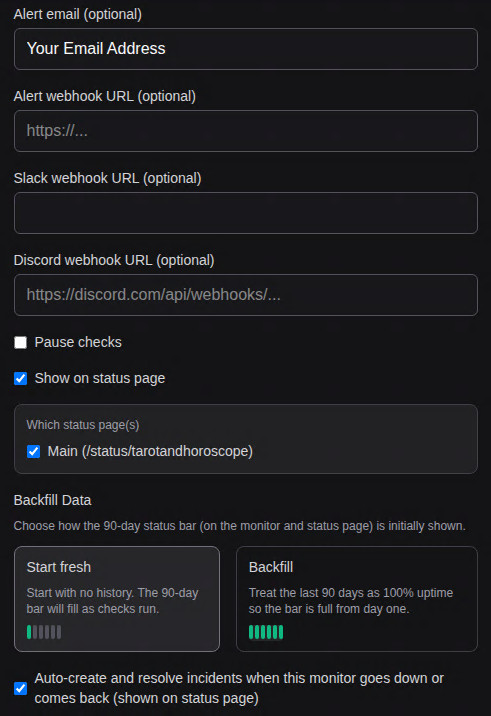
Set Alert email on the monitor (add or edit). We send a plain-text email on down and on recovery. Delivery uses your configured SMTP or Resend.
Webhook
Set Alert webhook URL to any HTTPS endpoint (your server, Zapier, Make, IFTTT, etc.). When the monitor goes down or recovers, we POST a JSON body to that URL.
Down payload example:
{
  "monitor_id": "uuid",
  "name": "My API",
  "url": "https://api.example.com",
  "status": "down",
  "message": "Did not respond to the last check"
}
Recovery payload also includes "down_duration": "5 minutes" (or similar). You can use this to log, create tickets, or trigger automation. We only send one request per transition (down or up).
Slack
- In Slack: Channel → Integrations → Incoming Webhooks → Add to Slack. Copy the webhook URL.
- In ReturnPod: add or edit the monitor, set Slack webhook URL to that URL.
- On down or recovery, we post a message to that channel (e.g. "ReturnPod: My API didn't respond to the last check.").
Discord
No bot required. Create a webhook in Discord: Channel Settings → Integrations → Webhooks → New Webhook. Copy the webhook URL. Paste it into Discord webhook URL on the monitor. We send a simple message on down and recovery so it appears correctly in your Discord channel.